
Introduction
The Anker Soundcore P20i is a pair of true wireless earbuds designed for people who want everyday audio features without spending too much money. Made by Soundcore, Anker’s audio brand, these earbuds offer a compact design, powerful bass, Bluetooth connectivity, and a portable charging case. They are suitable for listening to music, watching videos, enjoying podcasts, and making occasional phone calls. <Cite refs={[“turn639706search3″,”turn639706search1”]}/>
One reason the Soundcore P20i attracts attention in the budget wireless earbuds category is its combination of useful features and affordable pricing. The earbuds feature 10mm drivers for bass-focused sound, up to 10 hours of playback on a single charge, and up to 30 hours of total listening time with the charging case under the manufacturer’s test conditions. They also support quick charging, customizable controls, and sound adjustments through the Soundcore app. <Cite refs={[“turn639706search3″,”turn639706search0”]}/>
In this review, we will look at the Anker Soundcore P20i from several important angles, including sound quality, battery life, comfort, call performance, connectivity, and available features. We will also consider their strengths and limitations to help you decide whether these earbuds offer good value for money. Whether you need affordable earbuds for daily listening, travel, studying, or casual calls, this review will help you understand what the Soundcore P20i offers and what you should consider before buying.
Make the introduction more engagingAdd a clear review verdict
Anker Soundcore P20i: Quick Overview
The Anker Soundcore P20i is a budget-friendly pair of true wireless earbuds with bass-focused sound, Bluetooth 5.3, customizable audio settings, and a compact charging case. They are designed for everyday listening, phone calls, and watching videos without the hassle of wires. Here is a quick overview of their main specifications and what you can expect in the box. <Cite refs={[“turn549753search0″,”turn549753search12”]}/>
Key Specifications
The Soundcore P20i offers several useful features for its price range, including extended battery life, app support, and water resistance.
| Specification | Details |
|---|---|
| Driver size and sound technology | 10mm dynamic drivers with bass-focused sound |
| Bluetooth version | Bluetooth 5.3 |
| Battery life | Up to 10 hours per charge and 30 hours with the charging case |
| Charging time | Up to 2 hours |
| Fast charging | 10 minutes of charging provides up to 2 hours of playback |
| Microphone and call features | Two built-in microphones with AI-enhanced call processing |
| Water-resistance rating | IPX5 for the earbuds |
| Companion app support | Soundcore app with customizable touch controls and 22 EQ presets |
| Bluetooth range | Up to 10 meters (33 feet) under suitable conditions |
| Charging connection | USB-C |
Specifications are based on manufacturer information. Actual battery life can vary depending on volume, usage, and connection conditions. <Cite refs={[“turn549753search0″,”turn549753search1″,”turn549753search12”]}/>
Driver size and sound technology: The 10mm dynamic drivers are designed to deliver powerful bass, making these earbuds suitable for pop, hip-hop, and other bass-heavy music. The Soundcore app also allows users to adjust the equalizer settings to suit their listening preferences.
Bluetooth version: Bluetooth 5.3 provides wireless connectivity with compatible phones, tablets, and laptops. The advertised range is up to 10 meters, although walls and other sources of interference may reduce the effective range.
Battery life and charging time: The earbuds offer up to 10 hours of playback on a single charge, with the charging case extending total listening time to 30 hours. A quick 10-minute charge can provide up to two hours of playback, which is useful when you need power in a hurry.
Microphone and call features: Two built-in microphones and AI-enhanced processing help capture your voice during calls. Call clarity can still vary depending on background noise, network quality, and the device on the other end.
Water-resistance rating: The earbuds have an IPX5 rating, meaning they are designed to resist water jets under specified test conditions. They can be suitable for workouts and light rain, but they are not designed for swimming or submersion in water.
Companion app support: The Soundcore app provides access to EQ presets, customizable touch controls, and a Find My Earbuds feature. These options let you personalize your listening experience beyond the default settings. <Cite refs={[“turn549753search0″,”turn549753search1″,”turn549753search4”]}/>
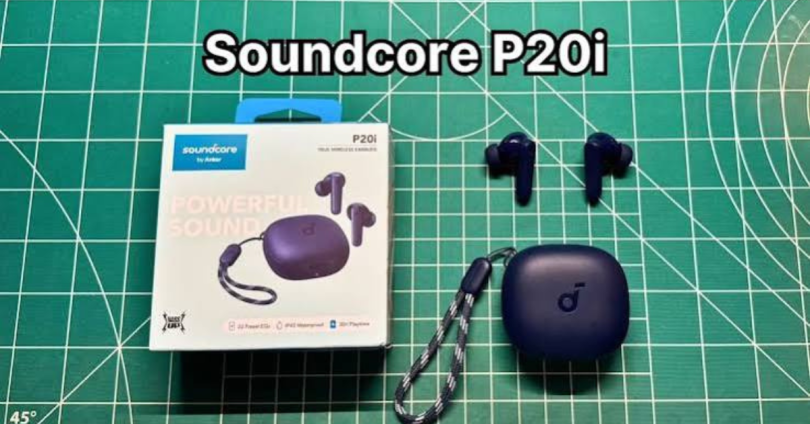
What Comes in the Box?
The standard Soundcore P20i retail package generally includes the following items:
- Soundcore P20i earbuds: One left and one right wireless earbud.
- Charging case: A compact case that stores and recharges the earbuds between uses.
- USB charging cable: A USB-C cable for charging the case.
- Ear tips: Silicone ear tips in different sizes to help you find a secure and comfortable fit.
- Documentation: A user guide and warranty information, depending on the market and package.
The exact package contents may vary by seller or region, so it is worth checking the product listing before purchasing. <Cite refs={[“turn549753search4″,”turn549753search12”]}/>
Overall, the Anker Soundcore P20i combines essential wireless features with useful customization options. Its 10mm drivers, advertised 30-hour total battery life, and IPX5 rating make it worth considering if you want affordable earbuds for everyday use.
Add pros and cons for buyersClarify battery claims and caveats
Design and Build Quality

The Anker Soundcore P20i features a simple, modern design that focuses on portability and everyday convenience. These true wireless earbuds have a stem-style shape, a compact charging case, and a lightweight construction that makes them suitable for commuting, studying, exercising, and daily music listening. Their practical design is one reason they stand out in the budget wireless earbuds category. <Cite refs={[“turn686018search0″,”turn686018search5”]}/>
Earbud Design and Appearance
The Soundcore P20i earbuds feature a familiar stem-style design with soft silicone ear tips that fit inside the ear canal. Their smooth finish and rounded shape give them a clean, understated appearance without unnecessary decorative details.
The silicone tips help create a secure fit and improve passive noise isolation by reducing some surrounding sounds. Different ear tip sizes are available to help users find a comfortable fit. For the best results, choose the size that sits securely without creating pressure or discomfort.
The earbuds also feature touch controls, allowing you to manage playback and calls without reaching for your phone. You can customize supported controls through the Soundcore app. Overall, their design is practical rather than luxurious, which is appropriate for their budget-friendly positioning. <Cite refs={[“turn686018search0″,”turn686018search6”]}/>
Charging Case Size and Portability
One of the most convenient aspects of the Soundcore P20i is its compact charging case. It is small enough to fit into most pockets, backpacks, or handbags, making it easy to carry the earbuds throughout the day.
The case includes a built-in lanyard, which allows you to attach it to a bag or keychain for easier carrying. This is a useful addition for people who travel frequently or prefer to keep their earbuds within easy reach.
The case stores and recharges the earbuds when they are not in use, helping extend the advertised total listening time to up to 30 hours. Its practical shape and portable design make it suitable for everyday use, although it may feel less premium than some higher-priced earbud cases. <Cite refs={[“turn686018search5″,”turn686018search6”]}/>
Available Colors
The Soundcore P20i is available in several color options, although availability depends on the country, retailer, and current stock.
Common options include:
- Black: A classic choice that works well for everyday use.
- White: A clean, minimal look that matches many devices.
- Blue: A colorful alternative for users who prefer something different.
- Light Blue: A softer shade with a more distinctive appearance.
- Pink: An option for users who prefer a brighter, more playful style.
Not every retailer stocks all five colors, so check the product listing before placing an order. <Cite refs={[“turn686018search0″,”turn686018search10”]}/>
Build Quality and Everyday Durability

The Soundcore P20i is designed for regular everyday use, with lightweight earbuds and a practical charging case. The earbuds are comfortable to carry and use, while the case helps protect them when they are not being worn.
They also have an IPX5 water-resistance rating, meaning the earbuds are designed to withstand water jets under specified test conditions. This makes them suitable for activities such as walking, commuting, and many workouts involving sweat. However, they are not waterproof for swimming or submersion, and the charging case should be kept away from water.
Although the P20i offers useful durability features for its price, its construction is still budget-oriented. Avoid dropping the earbuds or case, exposing them to excessive heat, or storing them in damp conditions. Handle the charging case carefully and keep the charging contacts clean to help maintain reliable performance over time. <Cite refs={[“turn686018search5″,”turn686018search2″,”turn686018search6”]}/>
Overall, the Anker Soundcore P20i delivers a practical combination of compact portability, simple styling, several color choices, and everyday water resistance. Its design prioritizes convenience and functionality over premium materials, making it a sensible option for buyers looking for affordable wireless earbuds.
Comfort and Fit
Comfort is an important factor when choosing wireless earbuds, especially if you plan to use them for music, online classes, work, or travel. The Anker Soundcore P20i features a lightweight, stem-style design and interchangeable silicone ear tips intended to provide a comfortable fit for everyday listening. Independent reviews generally find them comfortable for budget earbuds, although the fit can vary depending on your ear shape and size. <Cite refs={[“turn116449search0″,”turn116449search2”]}/>
Are Soundcore P20i Earbuds Comfortable?
The Soundcore P20i earbuds are relatively lightweight, so they do not feel excessively heavy when worn. Their stem-style design also makes them easy to handle when putting them in or taking them out of your ears.
Many users can wear them comfortably for several hours, making them suitable for listening to music, watching videos, and attending online classes. However, comfort is subjective. Some people may experience pressure or soreness after extended use, particularly if the ear tips are too large or the earbuds do not match their ear shape.
These earbuds are a practical choice for everyday listening, but it is a good idea to take occasional breaks during long sessions. If you experience persistent pain or irritation, remove the earbuds and check the fit before using them again.
Ear Tip Fit and Stability
The Soundcore P20i comes with multiple silicone ear tip sizes, allowing you to choose the option that fits your ears best. The right size helps keep the earbuds secure while improving passive noise isolation and bass response. <Cite refs={[“turn116449search1″,”turn116449search0”]}/>
If the ear tips are too small, the earbuds may feel loose, move around, or lose some bass. If they are too large, they may create pressure inside your ears and become uncomfortable.
The earbuds can remain stable during normal activities such as walking, studying, and commuting. However, vigorous exercise or repeated head movements may cause them to shift, depending on how well they fit.
For the best results, test each earbud separately and make sure both feel secure without creating excessive pressure.
Are They Suitable for Long Listening Sessions?
The Soundcore P20i can be suitable for extended listening sessions when you find the correct ear tip size. Independent testing has found that the earbuds can remain comfortable for around four to five hours for some users, although individual experiences differ. <Cite refs={[“turn116449search0″,”turn116449search8”]}/>
Their lightweight construction makes them useful for people who listen to podcasts, attend online meetings, or enjoy music throughout the day. However, wearing any in-ear headphones continuously for long periods may cause discomfort, especially if the fit is too tight.
To make longer sessions more comfortable:
- Take regular breaks to give your ears a rest.
- Keep the volume at a moderate level.
- Choose ear tips that fit securely without pressing too hard.
- Clean the ear tips regularly to maintain good hygiene.
- Stop using the earbuds temporarily if you notice pain or irritation.
Overall, the P20i offers reasonable comfort for its price, but it may not be ideal for everyone, particularly people with very small ear canals or sensitivity to in-ear designs.
Tips for Getting a Secure Fit
Getting the correct fit can improve comfort, stability, and sound quality. Follow these simple tips to get the most out of your Soundcore P20i earbuds.
- Choose the right ear tip size: Try the included sizes and select the one that feels secure without causing pressure.
- Check the left and right labels: Make sure you place each earbud in the correct ear.
- Insert them gently: Place the silicone tip into your ear canal and rotate the earbud slightly until it feels comfortable.
- Test the seal: Play music at a low volume. If the bass sounds weak or the earbuds feel loose, try a different tip size.
- Check stability: Move your head gently and walk around to see whether the earbuds remain in place.
- Adjust each ear separately: Your ears may require different tip sizes, so do not assume that the same size will fit both sides.
- Keep the tips clean: Remove and clean the silicone tips according to the manufacturer’s instructions.
Soundcore’s official wearing guidance also recommends trying different ear tip sizes and gently rotating the earbuds to find the most comfortable position. <Cite refs={[“turn116449search1″,”turn116449search4”]}/>
In conclusion, the Anker Soundcore P20i offers good everyday comfort for many budget-earbud users. Its lightweight design and replaceable silicone tips help provide a secure fit, but choosing the correct tip size is essential for comfortable, stable listening.
Anker Soundcore P20i Sound Quality Review
The Anker Soundcore P20i delivers a bass-focused listening experience designed for people who enjoy energetic music without spending a lot on wireless earbuds. Its 10mm dynamic drivers produce noticeable low-end impact, while the Soundcore companion app offers several equalizer presets to adjust the sound. However, independent reviews suggest that the strong bass can sometimes overpower vocals and softer instrument details. <Cite refs={[“turn110841search0″,”turn110841search1”]}/>
Overall, these earbuds are worth considering for casual listening, podcasts, and bass-heavy playlists. If you prefer a neutral sound signature with highly detailed vocals and sparkling treble, you may need to experiment with the EQ settings to get a more balanced result.
Bass Performance and BassUp Technology
Bass is one of the main highlights of the Soundcore P20i. Its 10mm drivers deliver punchy low frequencies that give kick drums, bass guitars, and electronic beats a fuller, more energetic sound. This makes the earbuds appealing to listeners who enjoy music with a strong rhythm.
The P20i also supports Soundcore’s BassUp EQ preset, which increases the emphasis on low frequencies. It can make electronic dance music, hip-hop, and workout playlists feel more powerful, especially at moderate listening volumes.
However, the extra bass is not ideal for everyone. Some reviewers found that low frequencies can sound heavy or slightly muddy in bass-rich tracks, making other instruments less prominent. If you prefer cleaner, more controlled bass, try a less bass-heavy EQ preset instead. <Cite refs={[“turn110841search0″,”turn110841search3″,”turn110841search5”]}/>
Vocal Clarity and Midrange Performance
The midrange is important because it carries much of the detail in vocals, guitars, pianos, and other central musical elements. On the Soundcore P20i, vocals are generally listenable, but the strong bass emphasis can make some voices and instruments sound less prominent.
Podcasts, audiobooks, and everyday spoken content remain suitable uses for these earbuds. However, listeners who focus on subtle vocal details, acoustic performances, or complex arrangements may notice that some sounds lack the openness and separation found in more expensive models.
The overall experience also depends on the recording and EQ settings. Switching to a more balanced preset may help bring vocals and midrange instruments forward in the mix. <Cite refs={[“turn110841search1″,”turn110841search5”]}/>
Treble and High-Frequency Details
Treble affects the brightness and definition of sounds such as cymbals, high piano notes, guitar details, and delicate vocal textures. The Soundcore P20i has a relatively subdued treble presentation compared with its prominent bass.
This tuning can make long listening sessions less fatiguing for people who dislike sharp or overly bright highs. However, it also means that some recordings may lack sparkle, air, and fine detail. Instruments that should sound crisp can feel softer or sit further back in the mix.
If you prefer brighter sound, the Treble Booster preset in the Soundcore app is worth trying. It can improve the perceived clarity of high-frequency sounds, although it will not transform the earbuds into a high-detail audio product. <Cite refs={[“turn110841search0″,”turn110841search2″,”turn110841search4”]}/>
Sound Quality at High Volume
The Soundcore P20i can play music at satisfying volumes, but increasing the volume does not necessarily improve sound quality. Because the earbuds already emphasize bass, louder playback may make low frequencies feel more dominant and can reduce the perceived balance between bass, vocals, and treble.
For the most enjoyable experience, start at a moderate volume and adjust the EQ to suit your preferences. If the sound becomes harsh, muddy, or uncomfortable, lower the volume rather than increasing it further.
As with any headphones, avoid prolonged listening at high volumes to help protect your hearing. The best setting is one that lets you hear the music clearly without discomfort.
Best Music Genres for These Earbuds
The Soundcore P20i is best suited to listeners who enjoy a warm, bass-forward sound rather than a strictly neutral presentation.
- Hip-hop and rap: Strong bass gives beats and low-frequency rhythms extra impact.
- Electronic dance music: The bass emphasis adds energy to synths and electronic percussion.
- Pop music: Catchy rhythms and bass-driven arrangements can sound lively and engaging.
- Workout playlists: Punchy low frequencies can make energetic tracks more enjoyable during exercise.
- Rock music: Bass guitars and drums have weight, although some guitar details may sound less prominent.
- Podcasts and audiobooks: Spoken content is suitable for everyday listening, even though these earbuds are not specifically tuned for speech.
Classical music, acoustic jazz, and recordings that rely heavily on delicate high-frequency details may sound less spacious or defined. Your experience will depend on your personal preferences, the recording quality, and your chosen EQ setting. <Cite refs={[“turn110841search0″,”turn110841search1″,”turn110841search5”]}/>
Can You Customize the Sound?
Yes. The Soundcore P20i supports the Soundcore companion app, which includes preset equalizer profiles for different listening preferences. Depending on the app version and firmware, you can choose profiles such as Bass Reducer, BassUp, Classic, Podcast, Rock, Pop, and Treble Booster. <Cite refs={[“turn110841search2″,”turn110841search5”]}/>
To customize the sound:
- Install the official Soundcore app on your compatible phone.
- Connect your P20i earbuds to your phone.
- Open the app and select your earbuds.
- Find the equalizer or EQ settings.
- Try different presets while playing a familiar song.
- Keep the profile that gives you the best balance of bass, vocals, and treble.
If the bass feels too strong, start with Bass Reducer. If the sound seems too dark, try Treble Booster or Classic. For spoken content, the Podcast or Spoken Word preset may be worth testing if available in your app version.
One limitation is that the P20i’s app-based
Soundcore P20i Battery Life
Battery life is an important factor when choosing wireless earbuds, especially if you use them for music, online classes, phone calls, or daily travel. The Anker Soundcore P20i offers up to 10 hours of listening time on a single charge and up to 30 hours when used with the charging case. It also supports fast charging, making it a practical option for people who need extra power without waiting too long. Actual battery performance depends on volume, usage, and other conditions. Source: Soundcore official website
Battery Life on a Single Charge
The Soundcore P20i provides up to 10 hours of music playback on a single charge under the manufacturer’s test conditions. This is enough for several hours of listening throughout the day without needing to put the earbuds back in their case.
For example, if you listen to music for two to three hours daily, a fully charged pair may last several days of use before the earbuds themselves need to be recharged. However, this is only an estimate because actual playback time varies depending on how you use them.
Phone calls generally consume more battery than music playback. According to Soundcore’s official FAQ, the P20i offers up to six hours of calling time on a single charge. These figures are based on laboratory testing at 50% volume with default settings, so your results may differ. Source: Soundcore P20i FAQ
Total Battery Life with the Charging Case
The charging case extends the Soundcore P20i’s total advertised listening time to up to 30 hours. Since the earbuds provide up to 10 hours on their own, the case supplies additional charging power when the earbuds are placed inside it.
This makes the P20i useful for commuting, travelling, studying, and everyday entertainment. You can recharge the earbuds between listening sessions without needing to connect the case to a power source every time.
Keep in mind that the 30-hour figure represents total playback time across multiple charges, not 30 continuous hours from one charge. Frequent calls, higher volume, and other usage conditions can reduce the total time available.
Fast Charging: How It Works
One of the most useful battery features of the Soundcore P20i is its fast-charging capability. Soundcore states that charging the earbuds for just 10 minutes can provide up to two hours of playback. This can be helpful when you discover that your earbuds are almost out of battery shortly before leaving home. Source: Soundcore
For example, if you want to listen to music during a commute but have forgotten to charge the earbuds overnight, a short charging session may provide enough power for your journey.
For the best results, use a compatible USB-C charging cable and a suitable power source. Keep the charging contacts clean and dry, and make sure the earbuds are seated correctly inside the case. Fast-charging results may vary with the battery’s current level and condition.
Factors That Affect Battery Performance
Although the Soundcore P20i is advertised with up to 10 hours of playback per charge, several factors can affect how long the battery lasts in everyday use.
- Volume level: Listening at high volume can reduce playback time compared with listening at moderate volume.
- Phone calls: Using the earbuds for calls may provide less battery life than listening to music.
- Usage patterns: Frequently taking the earbuds out, reconnecting them, and switching between activities can affect overall battery consumption.
- Bluetooth connection: Wireless connection conditions and interference may influence power use.
- Battery age: Rechargeable batteries gradually lose capacity over time, so older earbuds may not last as long as they did when new.
- Charging habits and storage: Excessive heat and poor storage conditions can contribute to battery wear.
Remember that the manufacturer’s figures are maximum estimates measured under specific conditions. If your earbuds consistently provide much less playback time than expected, check the charging contacts, confirm that both earbuds charge properly, and consult Soundcore support if the problem continues.
Tips to Make the Battery Last Longer
You can follow a few simple habits to get more use from your Soundcore P20i earbuds and help preserve their battery over time.
- Keep the volume moderate. Avoid listening at maximum volume for long periods when a lower level is comfortable.
- Return the earbuds to the case when not in use. This helps protect them and allows them to recharge between listening sessions.
- Keep the charging contacts clean. Dust or debris can interfere with charging, so clean the contacts gently with a dry, soft cloth.
- Avoid extreme temperatures. Do not leave the earbuds or charging case in a hot car or direct sunlight for extended periods.
- Use a suitable charger and cable. Follow the manufacturer’s charging guidance rather than using damaged or unsuitable accessories.
- Check the battery before travelling. Charge the case and earbuds ahead of time if you expect to use them for several hours.
- Avoid leaving the earbuds unused in unsuitable conditions for long periods. Store them in a cool, dry place and follow the manufacturer’s care recommendations.
These habits cannot prevent normal battery aging, but they can help you maintain reliable performance and get the most out of each charge.
Overall, the Soundcore P20i offers competitive battery life for everyday wireless earbuds. Its advertised 10-hour playback time, 30-hour total with the case, and quick-charge feature make it a convenient choice for casual listening, studying, and commuting.
Charging and Charging Case
The Anker Soundcore P20i comes with a compact charging case that stores and recharges the earbuds when they are not in use. It uses a USB-C charging port, making it easy to recharge with a compatible cable. Understanding how to charge the earbuds, check the battery level, and solve common charging problems can help you use them more reliably.
How to Charge the Earbuds
Charging the Soundcore P20i earbuds is simple. The charging case supplies power to the earbuds whenever they are correctly placed inside it.
Follow these steps to charge your earbuds:
- Place both earbuds in the charging case. Make sure the left and right earbuds are in their correct positions.
- Check the charging contacts. The metal contacts on the earbuds should connect properly with the pins inside the case.
- Close the case lid. This helps protect the earbuds while they charge.
- Allow the earbuds to recharge. Keep them inside the case until they have enough battery for your next listening session.
Before charging, remove any protective insulation stickers if the earbuds are new. Make sure the earbuds and charging contacts are clean and dry. If an earbud does not charge, reposition it in the case and check whether the charging contacts are making a proper connection.
For the best results, fully charge the earbuds and charging case before using them for the first time. Source: Soundcore P20i user guide
How to Charge the Case
The Soundcore P20i charging case uses a USB-C port for charging. You can connect it to a compatible USB power source using a suitable USB-C cable.
Here is how to charge the case:
- Connect the USB-C cable to the charging port on the case.
- Connect the other end of the cable to a suitable USB power source.
- Check the case’s indicator light, if available, to monitor charging status.
- Allow the case to charge before disconnecting the cable and using it to recharge your earbuds.
Important: Always make sure the USB-C port and earbuds are completely dry before charging. Avoid charging wet earbuds or using damaged cables, and do not expose the case to excessive heat while it is connected to power.
Keeping the case charged is important because the earbuds rely on it for additional battery power when you are away from a charger.
How to Check the Battery Level
Checking the battery level helps you avoid running out of power while listening to music, watching videos, or making phone calls.
You can use these methods to check the battery status of your Soundcore P20i:
- Check your phone: When the earbuds are connected through Bluetooth, your phone may display their battery level. The exact display depends on your phone and operating system.
- Use the Soundcore app: Connect the earbuds to the official Soundcore app to access supported device information and settings.
- Check the case indicator: The charging case’s indicator light can provide information about charging or power status, depending on the light pattern.
Keep in mind that an indicator light does not necessarily show an exact battery percentage. If you need a more precise reading, check whether your phone or the Soundcore app displays the battery level.
It is a good idea to check the battery before leaving home, particularly if you plan to use the earbuds during a long journey or several hours of work.
Common Charging Problems and Solutions
Although the Soundcore P20i is designed for convenient charging, you may occasionally experience problems. Most basic charging issues can be checked at home.
1. The earbuds are not charging
If one or both earbuds do not charge when placed in the case, first check whether the case has enough battery power. Then remove the earbuds and place them back inside, making sure they sit correctly on the charging contacts.
If the problem continues, gently clean the contact pins on the earbuds and inside the case with a soft, dry cloth or cotton swab. Avoid scratching the contacts or allowing moisture to enter the case.
2. The charging case is not charging
If the case does not appear to charge, try another compatible USB-C cable and a different suitable USB power source. Check the charging port for visible dust or damage, but do not insert metal objects into it.
If the case still does not respond, it may have a faulty cable, charging port, or battery and may need professional support.
3. The earbuds remain connected to your phone inside the case
The earbuds should normally disconnect from your connected device when they are correctly placed in the case. If they remain connected, check that the case has power and that the earbuds are making proper contact with the charging pins.
Clean the contacts gently and try placing the earbuds back in the case before closing the lid.
4. Only one earbud charges
Remove both earbuds and check whether either one has dirt on its charging contacts. Reposition the earbud that is not charging and confirm that it sits securely in its slot.
If only one earbud continues to charge, test the case with both earbuds individually and contact Soundcore support if the issue persists.
5. The earbuds will not turn on after charging
First, confirm that the charging case has sufficient power and that the earbuds have been seated correctly during charging. If they still do not turn on, try resetting them according to the manufacturer’s instructions.
Soundcore’s P20i troubleshooting guidance describes a reset procedure involving wearing both earbuds and pressing and holding both touch controls for approximately 10 seconds until a beep is heard. Follow the official instructions for your model if the procedure differs. Source: Soundcore battery troubleshooting
If none of these steps solves the problem, contact Soundcore support rather than attempting to open or repair the rechargeable battery yourself.
Overall, the Soundcore P20i’s USB-C charging case makes everyday charging straightforward. Keeping the case powered, the contacts clean, and all charging components dry can help prevent many common charging problems.
You may also like to read these posts:
Best Toilet Repair Kit: Top Choices for Easy and Reliable Toilet Repairs
Best Toilet Repair Kit: Top Picks for Easy and Reliable Toilet Repairs
Best Drain Snake for Home: Top Picks for Easy and Effective Clog Removal
Microphone and Call Quality
The Anker Soundcore P20i features two built-in microphones and an AI-enhanced algorithm designed to improve voice pickup during phone calls. This makes the earbuds suitable for everyday conversations, but their microphone performance has some limitations, particularly in noisy environments. Independent reviews report that calls are generally more manageable in quiet surroundings than in places with traffic, wind, or other background noise. <a href=”https://www.soundcore.com/products/p20i“>Soundcore’s official product page</a> confirms the dual-microphone and AI call-enhancement features, while independent testing highlights the limitations in challenging conditions.
Voice Clarity During Phone Calls
The Soundcore P20i can handle regular phone calls, allowing you to talk without holding your phone next to your mouth. Its built-in microphones pick up your voice, and the AI-enhanced processing is designed to help make speech easier for the other person to understand.
However, voice quality may not sound as natural or full as it does with more expensive earbuds. Some independent reviewers found that voices could sound thin or less clear, even when the words remained understandable. <Cite refs={[“turn592151search1″,”turn592151search2”]}/>
For everyday conversations with friends, family, or colleagues, the P20i can be adequate. If you frequently make important business calls or need consistently clear microphone audio, you may want to consider earbuds with stronger call-quality performance.
Performance in Quiet Environments
Quiet environments are where the Soundcore P20i is most likely to perform acceptably during calls. At home, in a quiet office, or in a room with minimal background noise, the microphones can pick up your voice without competing with many distracting sounds.
The other person should generally be able to understand your speech, although the microphone’s sound quality may still be less refined than that of premium wireless earbuds. Independent testing has found that the P20i can manage occasional calls in quiet conditions, but its call quality is not among its strongest features. <Cite refs={[“turn592151search0″,”turn592151search1”]}/>
For better results, speak at a normal, clear volume and keep the microphone openings free from dust. Also, make sure the earbuds fit properly and that your phone is connected to the correct Bluetooth audio device.
Call Quality in Noisy Places
Noisy environments are a bigger challenge for the Soundcore P20i. Traffic, wind, busy cafés, public transport, and conversations happening nearby can interfere with the microphone’s ability to capture your voice clearly.
Although the AI-enhanced microphones are designed to improve voice pickup, they do not eliminate all background noise. Independent reviewers have reported that surrounding sounds can remain audible during calls and that wind can noticeably reduce voice clarity. <Cite refs={[“turn592151search0″,”turn592151search2”]}/>
If you need to take a call outdoors or in a crowded location, try these tips:
- Move to a quieter place whenever possible.
- Avoid standing directly in the wind.
- Speak clearly and slightly louder when background noise increases.
- Check that the microphone openings are clean.
- Test the earbuds with your phone’s regular calling app to check whether the issue is specific to another app.
Overall, the Soundcore P20i is better suited to occasional calls in relatively quiet surroundings than to frequent calls in noisy public places.
Are Soundcore P20i Earbuds Good for Online Meetings?
The Soundcore P20i can work for casual online meetings, online classes, and short video calls. Its wireless design gives you freedom to move around, while the built-in microphones let you speak without using your laptop’s microphone.
For short meetings from a quiet room, the P20i may be a practical budget option. However, its microphone quality may not be ideal for long professional meetings, job interviews, presentations, or situations where clear, natural speech is especially important.
Here is a quick overview:
- Online classes: Suitable for casual lessons in a quiet room.
- Personal video calls: Generally adequate when there is little background noise.
- Work meetings: Usable, but microphone quality may be inconsistent.
- Job interviews: A dedicated headset or a higher-quality microphone may be a safer choice.
- Meetings in noisy environments: Not recommended if clear voice transmission is essential.
Final verdict: The Soundcore P20i offers basic call functionality at a budget-friendly level, but microphone quality is a compromise. If your main priority is listening to music, podcasts, and taking occasional calls, it may meet your needs. If you spend several hours each day in online meetings, consider a headset designed specifically for clear voice communication.
FAQS:
Is the Anker Soundcore P20i worth buying?
Yes, the Anker Soundcore P20i is worth considering if you want affordable wireless earbuds with strong bass, customizable sound settings, and good battery life. However, they do not include active noise cancellation (ANC).
How long does the Soundcore P20i battery last?
The Soundcore P20i offers up to 10 hours of playback on a single charge and up to 30 hours with the charging case. Actual battery life may vary depending on volume, settings, and usage.
Does the Anker Soundcore P20i have noise cancellation?
No, the Soundcore P20i does not have active noise cancellation. Its in-ear design can help reduce some outside noise, but it cannot completely block background sounds.
Is the Soundcore P20i waterproof?
The earbuds have an IPX5 water-resistance rating, which means they can handle sweat and water splashes. However, they are not designed for swimming or submersion, and the charging case is not IPX5-rated.
Can I connect Soundcore P20i earbuds to an iPhone or laptop?
Yes, the Soundcore P20i earbuds can connect to compatible iPhones, Android phones, and Bluetooth-enabled laptops. Simply enable Bluetooth on your device, put the earbuds into pairing mode, and select Soundcore P20i from the available devices.
Conclusion
The Anker Soundcore P20i review shows that these wireless earbuds are a good option for people looking for affordable earbuds with powerful bass, customizable sound settings, and long battery life. With up to 10 hours of playback on a single charge and up to 30 hours with the charging case, they are suitable for everyday listening, commuting, and workouts.
However, the lack of active noise cancellation and the limitations of microphone performance in noisy environments may not suit everyone. Overall, the Soundcore P20i is worth considering if you want budget-friendly wireless earbuds with useful features and enjoyable sound quality. Before buying, compare the price and features with other earbuds to make sure they meet your needs.